
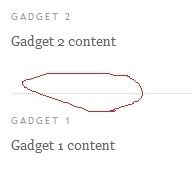
 First of all do you know what i am talking about?
I am talking about the separator line between gadgets , that dotted line what i have circled with red.
That line was using to many space of my template so i have removed. It`s simple to remove it , here is how to:
1. Go to Layout , Edit HTML
2. Find the following code(With firefox press CTRL+F and tipe .sidebar or other piece of the code):
.sidebar .widget, .main .widget {3. Change the red highlighted number to 0 so it will look like this:
border-bottom:1px dotted $bordercolor;
margin:0 0 1.5em;
padding:0 0 1.5em;
}
.sidebar .widget, .main .widget {NOTE: if you have more sidebars search for the following code too:
border-bottom:0px dotted $bordercolor;
margin:0 0 0;
padding:0 0 0;
}
.sidebar2 or 3 .widget, .main .widget {4. Save your template.
border-bottom:1px dotted $bordercolor;
margin:0 0 1.5em;
padding:0 0 1.5em;
}


9 comments